
All your servers in one place
A clear view of every instance, its status and the community online.
RCON ADMIN PANEL · ARMA REFORGER
The web admin panel for Arma Reforger servers: players, bans, access and activity from one place, with nothing to install in the game.
Free while the beta lasts, no card.
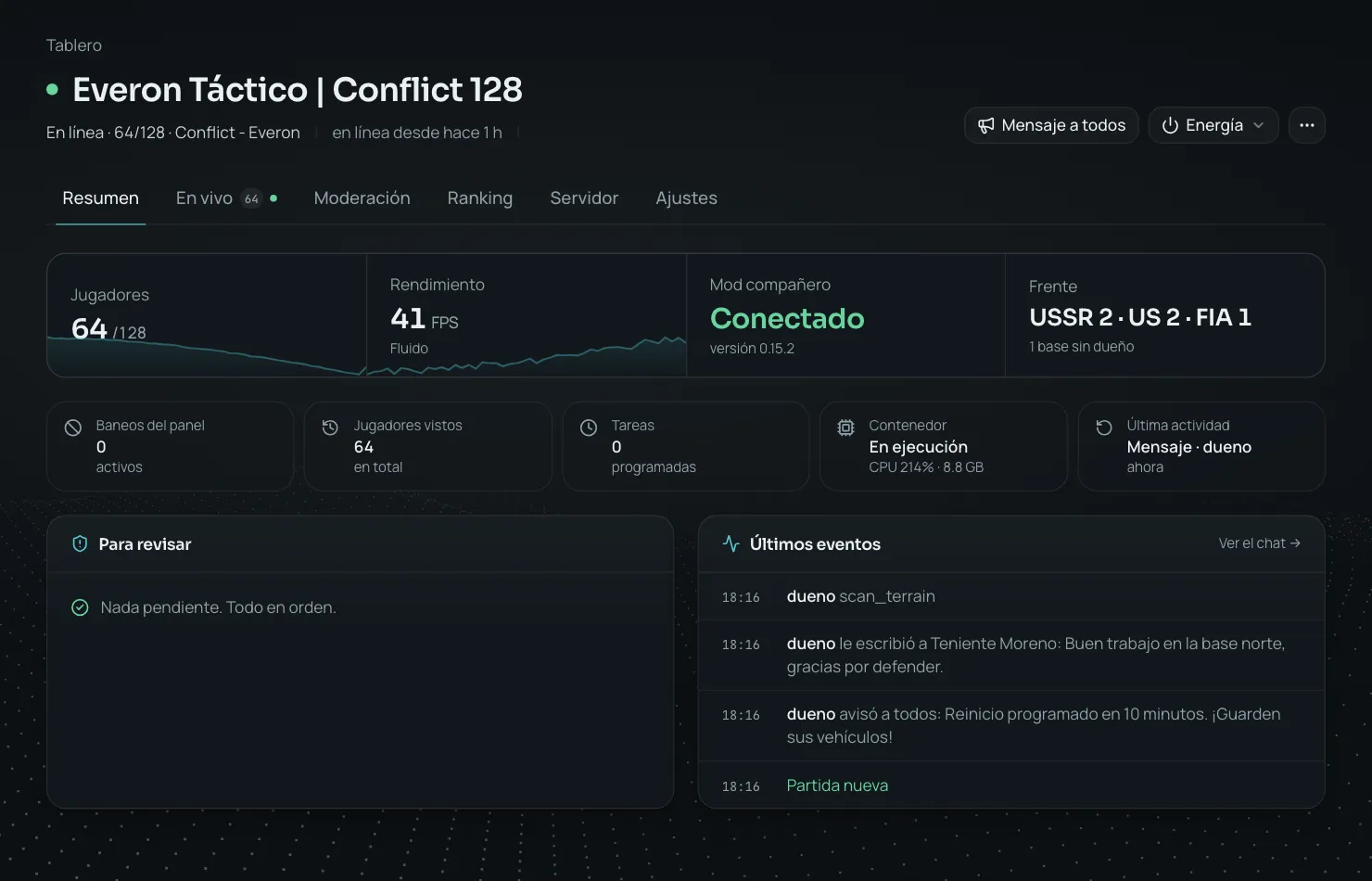
Reforger Ops replaces the RCON console and spreadsheets with an admin panel built for Arma Reforger communities: see who is connected and where they are on the map, ban with reason and duration, follow chat and kills instantly with the companion mod, teleport, heal, change time and weather, run a seasonal ranking with a public link, warn with automatic kick/ban, clean up lag, award your people, schedule restarts and publish the status on Discord. Works with self-hosted, rented or Pterodactyl servers.
A clear view of every instance, its status and the community online.
Act on players and bans without switching tools.
Invite co-admins and keep every server's access visible.
Review recent actions and gather context when something needs attention.
Screenshots of the panel exactly as you'll use it.
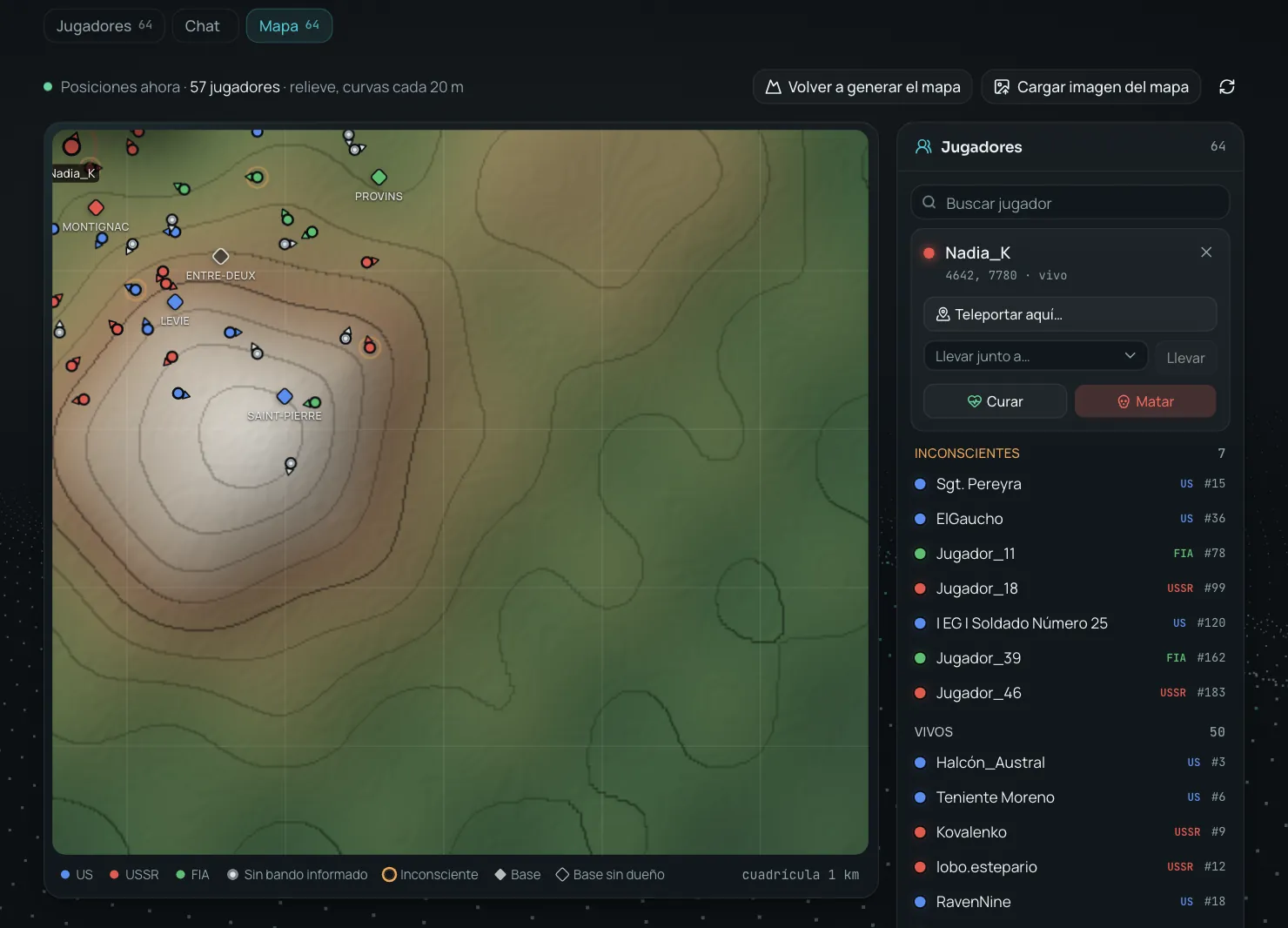
Every player with their heading, the Conflict bases and the terrain relief; zoom in, frame and act on anyone with one click.
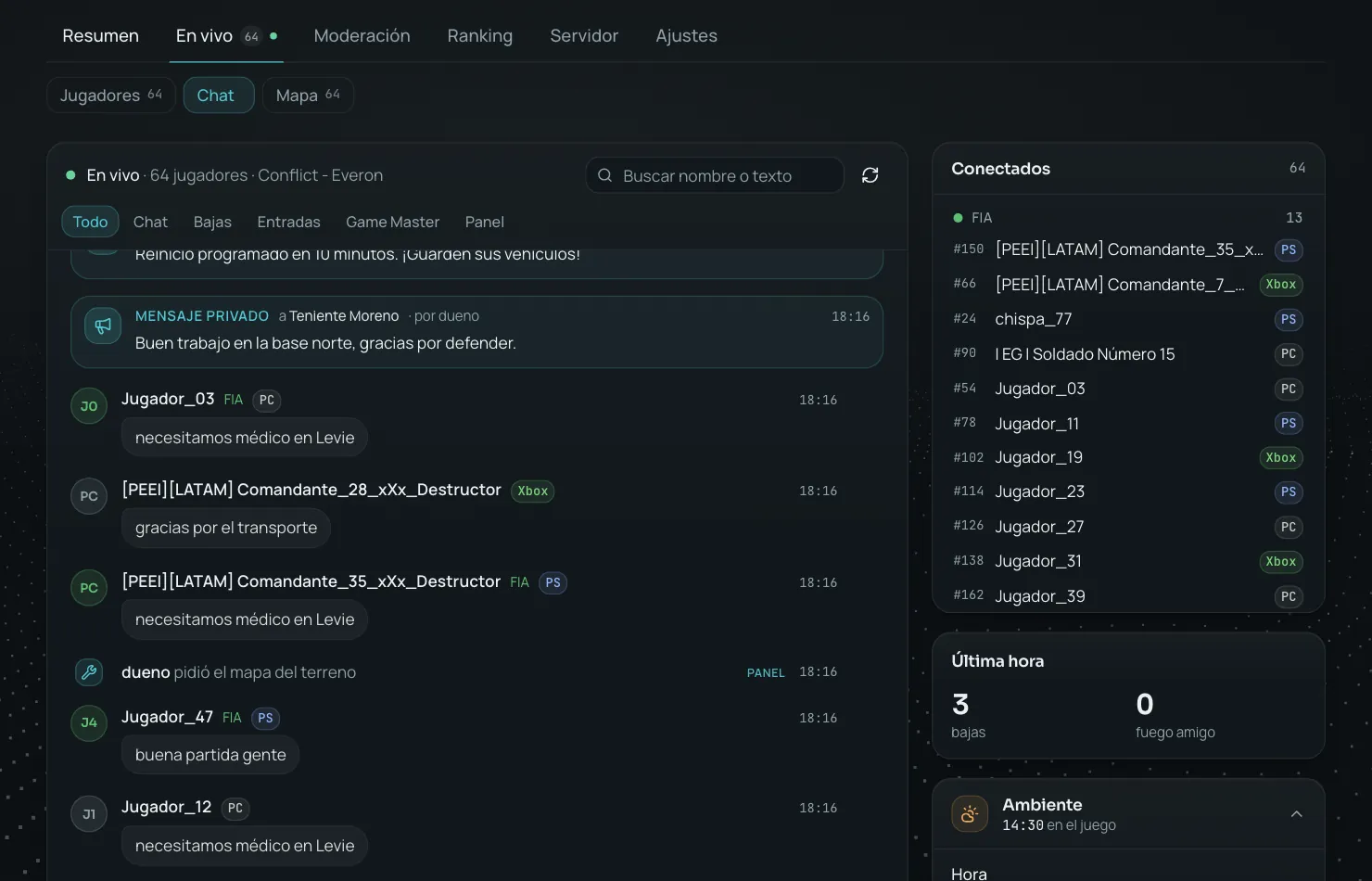
The game chat within a second, with kills and Game Master; reply to a player and see who's online, by faction.
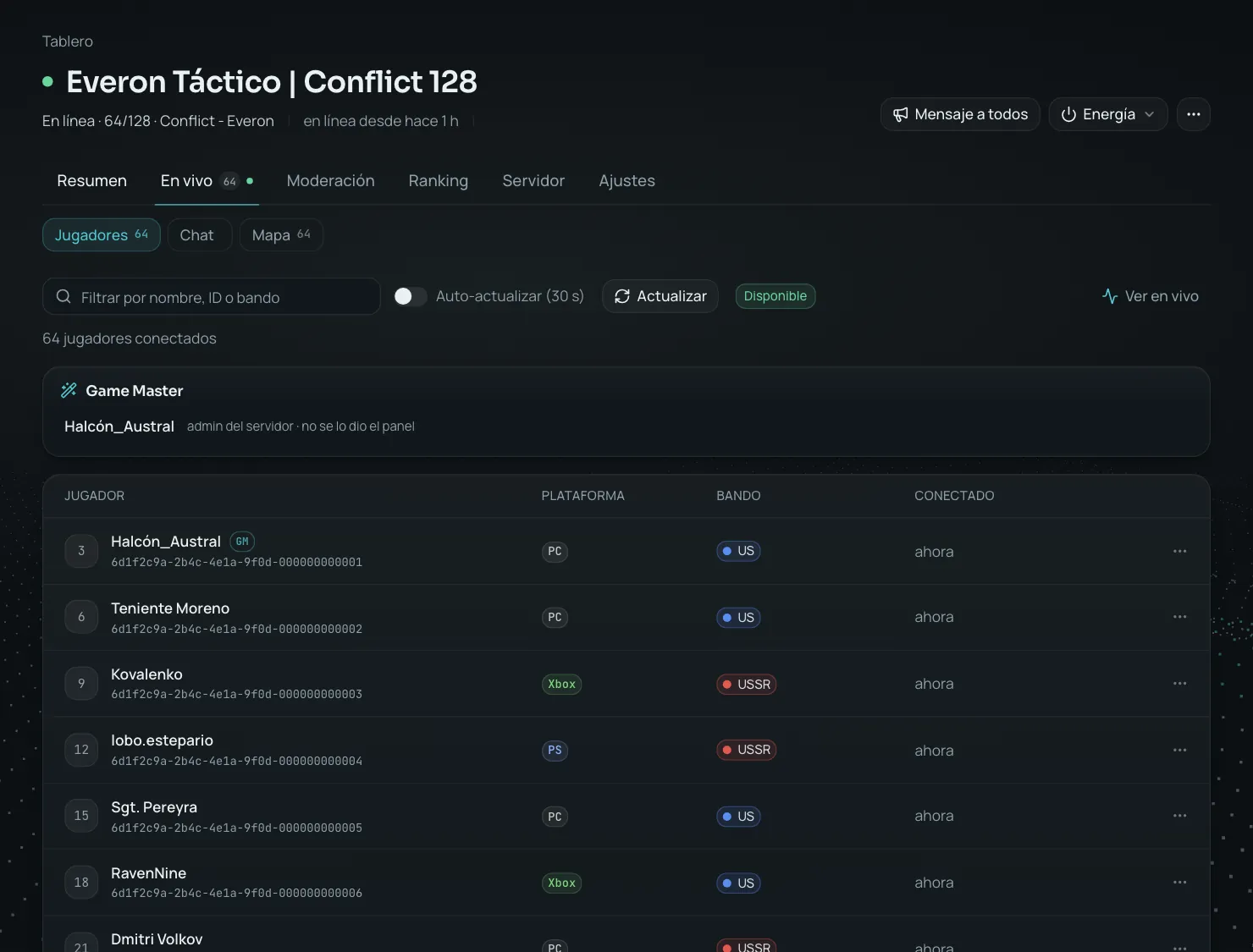
Who is connected, with their platform and faction; kick, ban or message them from each row.
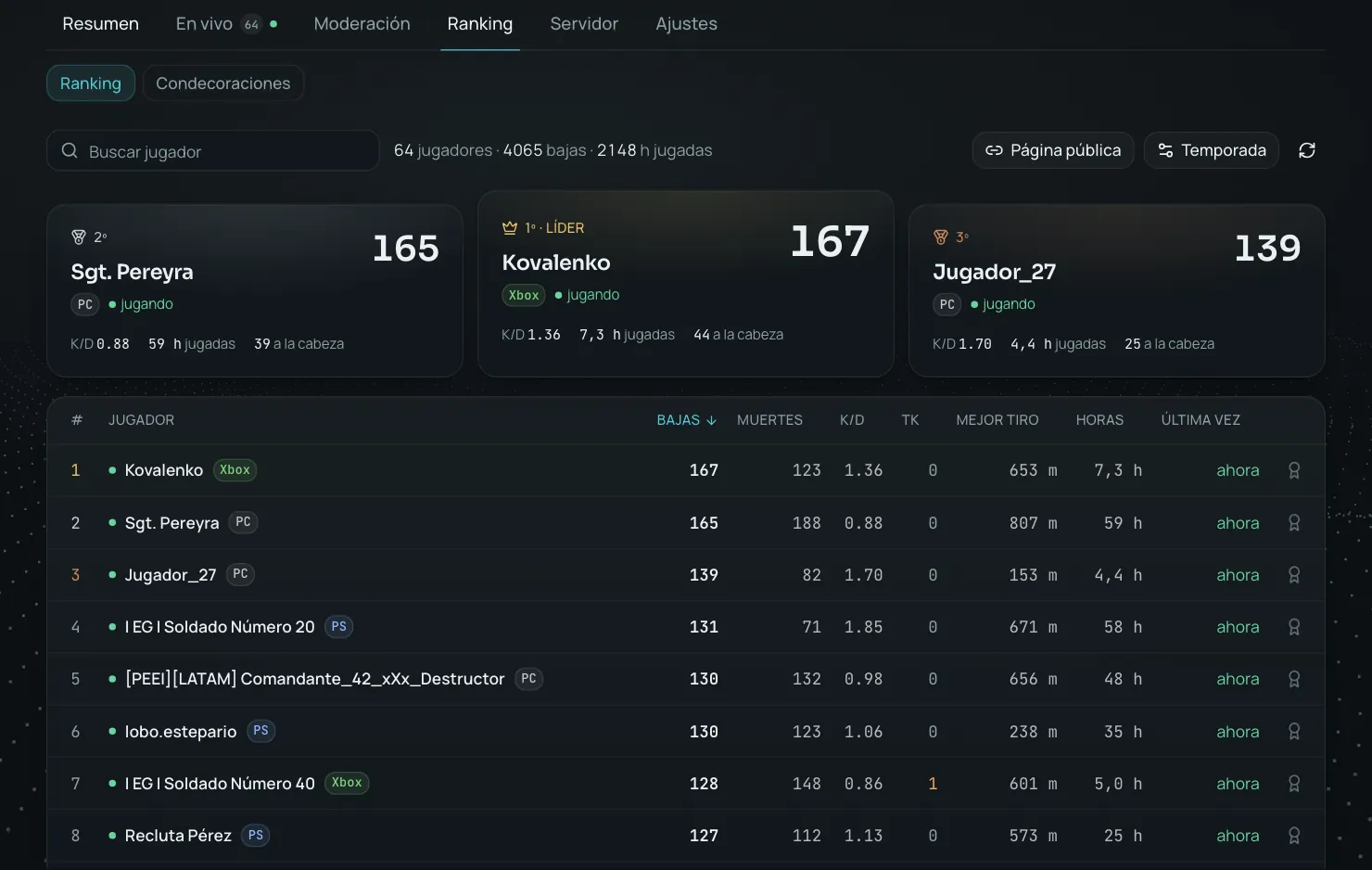
Kills, K/D, teamkills, headshots, longest kill and hours; with a public link for your community.
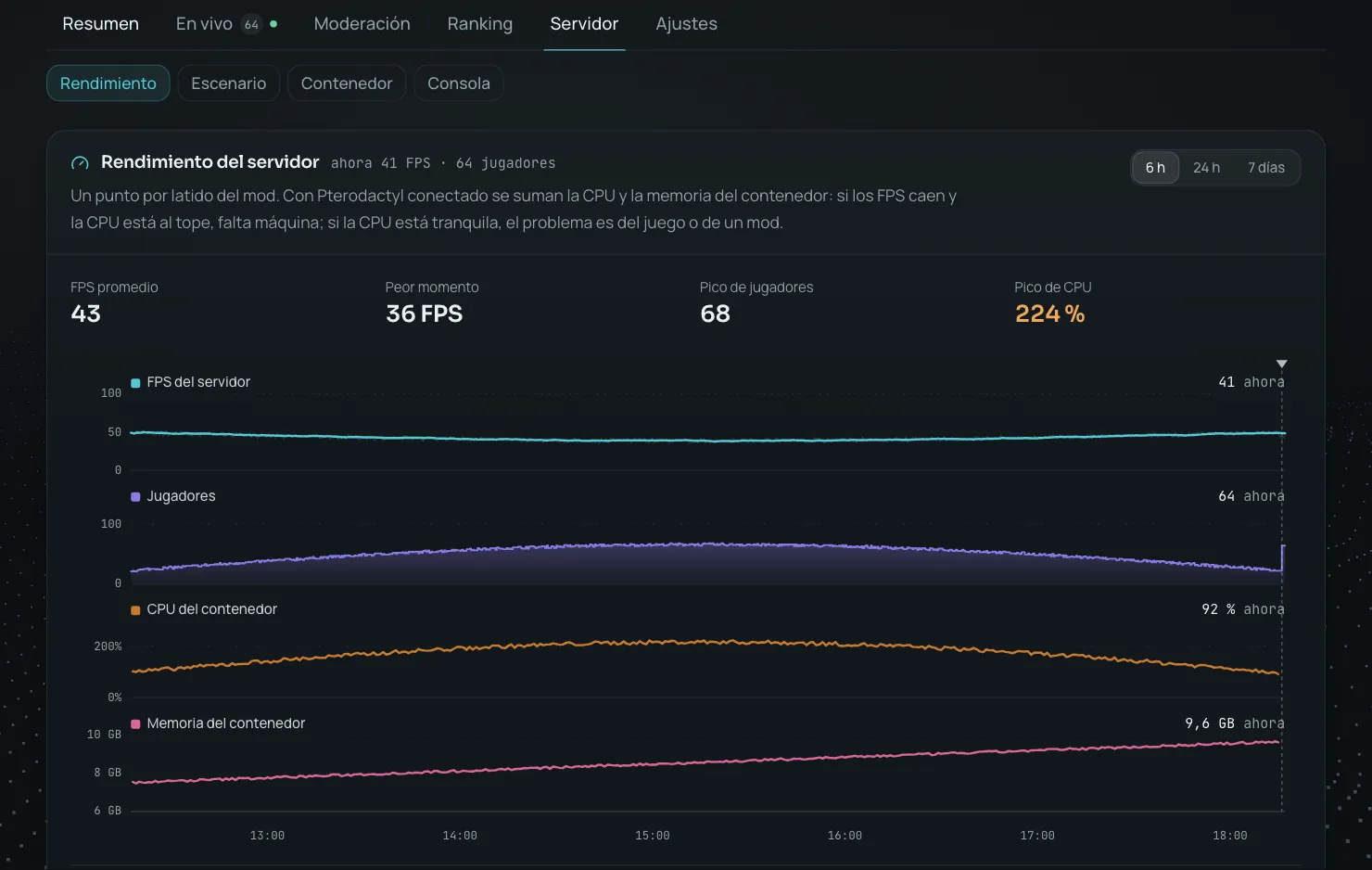
FPS and players per mod heartbeat, and every restart with its cause.
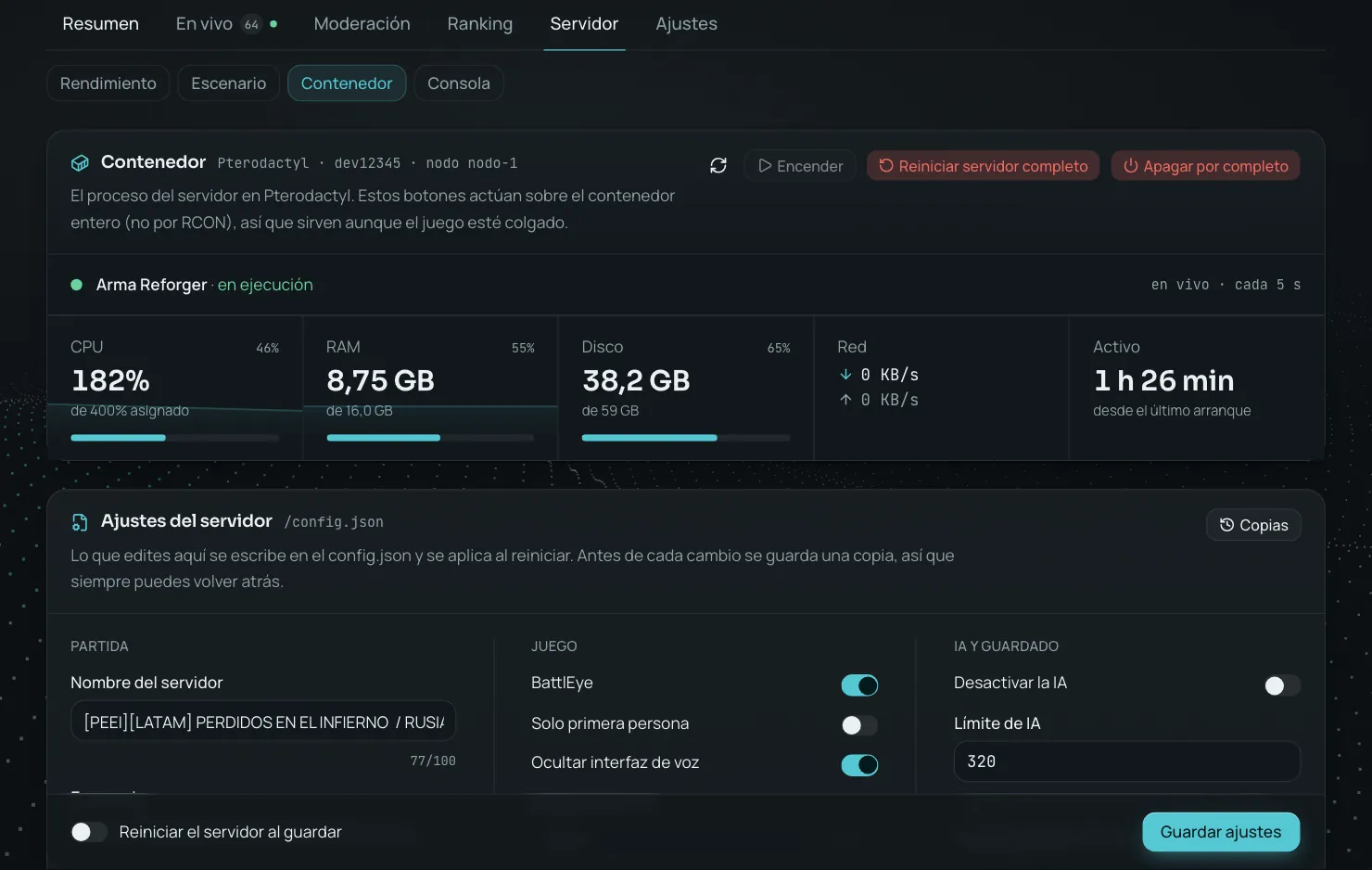
With Pterodactyl or Aether Panel: full restart, server settings and mods, with a backup before every change.
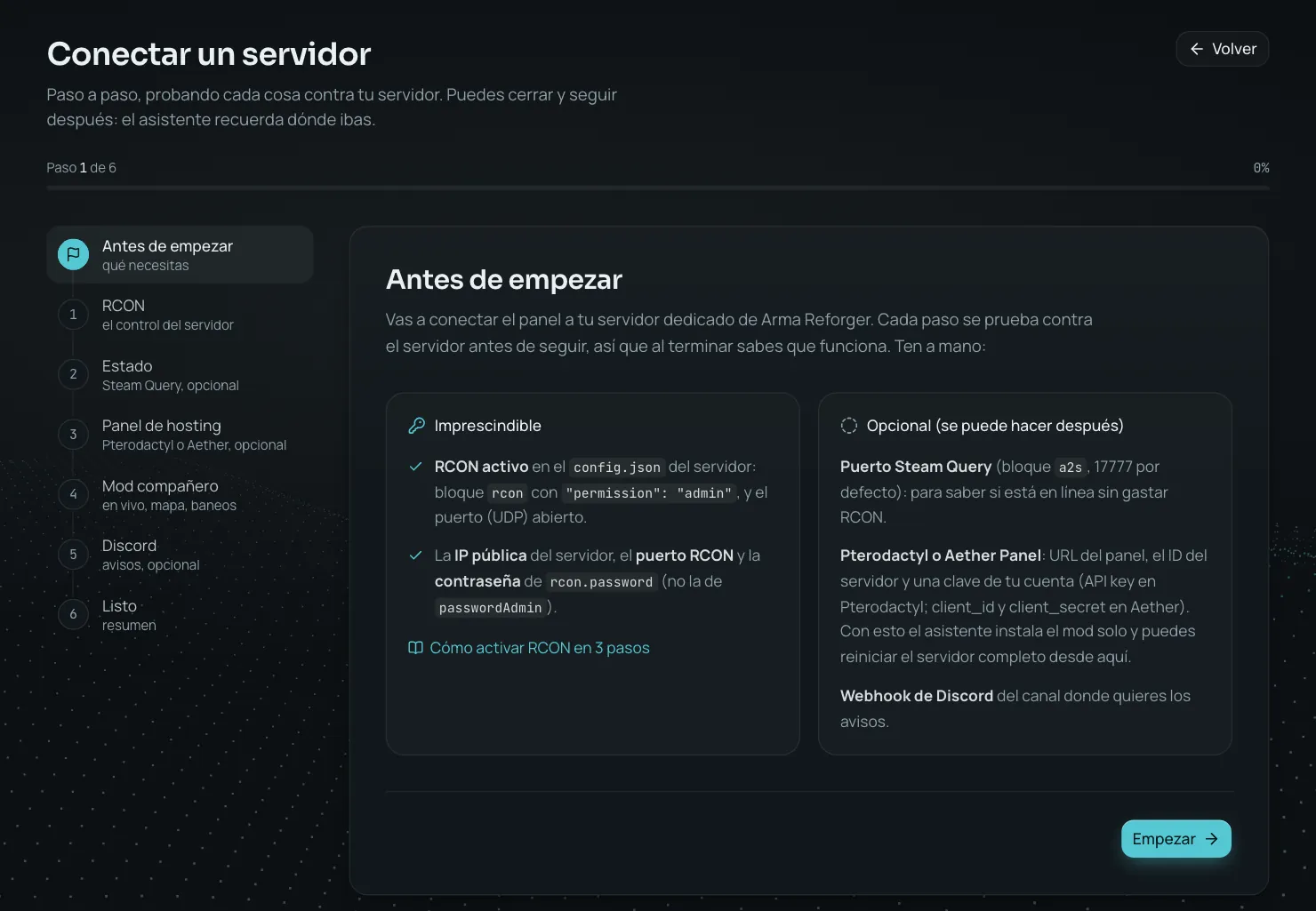
Every step is tested against your server before moving on and tells you where to get each value.
NEW LIVE OBSERVATION
Pick someone on the map and the panel shows you what they're doing, five times a second and from above: where they move, where they aim, every shot and every grenade, their stance, health, weapon and when they talk on voice. No video and nothing for players to install: the companion mod reads it on the server.
Create your account, connect your server and play: the panel does the rest. Nothing to install in the game to get started; the companion mod is optional.
Get startedA six-step wizard asks for the IP, the RCON port and the password from the RCON block of your config.json, and tests every value against your server before moving on. In a minute you see players and bans.
A server-side mod from the Workshop: your players install nothing. It unlocks chat, the live map, live observation of a player, detailed kills, the ranking, temporary Game Master, ranks that stick, match watch, messages, time of day, weather and match settings. If you use Pterodactyl, the panel sets the configuration up for you.
Share invitation links with expiry and connect Discord. Your co-admins operate, you keep control and your community hears about everything.
Clear tools to run servers, moderate the community and keep the team informed.
Who gets in, who stays and who doesn't come back: players, bans, warnings, reports, watchdog, history and awards.
Who is connected, with their Identity ID. Instant filter, auto-refresh, copy ID and, on every row, a message, a kick (once, or for a while, which expires on its own) or a ban.
Ban by Identity ID even after the player has left, with duration and reason. The panel remembers who banned and when it expires; temporary bans are removed on their own when they expire. Global ban across all your servers, import from CSV, #ban list output #ban list or another server of yours, and CSV export. With the companion mod, bans go through the game's own API and the list refreshes itself while you watch it.
A profile with aliases, stats, bans, warnings and internal notes. Warn a connected player on screen; at the Nth warning they are kicked or banned automatically. Quick reasons in one click and a platform badge: PC, Xbox or PlayStation.
Every read is recorded: names used, first and last seen, how many times. Search by name or UUID across all your servers and ban someone who already left.
Create your unit's medals and award them with a reason: it is announced in the game chat and kept in the player's profile and on the honour board. Made for academies and squads with ranks.
Server-side rules that raise a suspicion with evidence — impossible speed, position jumps, headshot streaks, kills at odd distances — for a human to look at. It is not an anti-cheat and out of the box it punishes nobody: if you want, set it to warn, kick or ban at the Nth suspicion. The chat filter flags messages by whole word, without the player noticing.
Players report without leaving the game: !report John killed me at base. The panel works out who they mean among the players online, confirms on their screen that the report arrived and alerts your staff on Discord, in its own channel if you want. If three people report the same player, the alert says so. A report never punishes on its own: a person decides.
Flag a player and the panel tells you when they come back, with the reason you wrote and how many times they have joined since. And if someone returns with a different Bohemia account from the same platform as a banned one, it tells you too. It warns you, it never punishes: sharing a computer is a thing.
Every ban, kick, restart or change is recorded with who did it, when and the result.
What RCON can't see, the moment it happens: chat, map, kills, the war in Conflict, ranking, environment and match settings.
With the companion mod (server-side, players install nothing) the chat arrives within a second and reads like a chat: newest at the bottom, kills, joins and Game Master on the same timeline, and next to it who's online, by faction. Reply to a player from there and only they get it; their profile or a ban, in each line's menu.
Every player on the map with heading and state (alive, unconscious, dead, not deployed). Teleport with one click, heal or revive, kill as Game Master and switch a player to another faction. The map is generated by the server itself: relief, contour lines and coastline of any terrain, vanilla or custom, with no image to upload. And if you prefer your own, upload an image and calibrate it with two points.
Who killed whom, with what weapon, from how many meters, whether it was a headshot, from which vehicle or whether it was a run-over or an explosion. All in the feed, on one line.
Give Game Master to someone who is playing right now, with no restart and without handing out the admin password. With an expiry (half an hour, as long as the mission lasts) and it is given back automatically if they reconnect. A list shows who has it and who is using it, and what they place and delete is recorded, with a Discord notice when someone opens it.
Which faction holds each base, on the map and in a list, and every capture logged with its time: how the match played out even if nobody was watching. Discord announces each capture with where the front stands, and the status message shows it.
Kills, deaths, K/D, headshots, longest shot and hours played with the companion mod. Manual, monthly or weekly seasons with a podium on Discord and a live message that updates itself. And a public page for your server, no login, to share on Discord: whether it's online, who's playing, how to join, your rules and the ranking below.
Dawn, noon, dusk or night in one click, or the exact hour. Change the weather among the ones the scenario offers, at once or with a transition. With the companion mod, without opening the Game Master.
Turn respawn on or off and change its timer, enable supplies and their cost multiplier, and choose what the kill feed shows, who sees it and what happens with friendly fire. It applies to the running match, from the panel.
A Conflict rank lives in the server session: it goes away on restart, and also when the player reconnects. The panel stores it per player and gives it back when they join, until you decide to reset them. The stored value only ever goes up, so a mod that was down or a half-finished restart cannot wipe anyone’s progress, and resetting ranks never takes anything from someone who is playing. Off by default: rank unlocks vehicles and weapons.
Let the server look after itself and keep your community informed: scheduled tasks, cleanup, recurring messages, Discord with a bot and commands, and alerts on your phone.
A scenario restart, a full container restart, a shutdown or an entity cleanup every day at the time you choose, in your time zone, warning the players before it runs. Plus scenario rotation: a list of maps, and the panel sets the next one and restarts; if the host does not answer, the next run retries the same map instead of skipping it.
The mod deletes bodies, wrecks and abandoned vehicles every few minutes, warns 30 seconds before and leaves the result under Live. Also schedulable every day; it never touches players or occupied vehicles.
Write to everyone or to one player: it lands in the chat and as an on-screen notice. Before a scheduled restart, the warning goes out by itself. And the reminders you keep repeating — your rules, your Discord, the restart time — get written once: up to ten messages that rotate, one every few minutes, never all at once.
One webhook per server: ban, kick, warning, teamkill, award, Game Master, server down and back online, unexpected restart, watchdog suspicion, watched player rejoining and a new mod version. Ranking and server status in live messages that update themselves, with a podium at the end of each season. Every alert carries your community's name and logo. The same alerts also go to Telegram. And if you prefer separate channels, the ranking, status, watchdog and reports each get their own.
Moderate from your phone without opening the panel: /players, /kick, /ban, /restart, each with the Discord role you choose — whoever can kick can't shut the server down. For your community, /status and /top with no role needed. And each player links their account: type !sync in the game, redeem the code with /link and get your verified role; with /me they see their own stats.
Install the panel as an app on your phone or computer and get a notification when the server goes down, a report comes in or a suspicion is raised, even with the panel closed and without going through Discord. You choose what each server alerts you about and your quiet hours; a crash still alerts you.
A pinned Discord message with online or down, players, scenario, FPS and in-game time, updated by itself every minute. Plus a 7-day chart with FPS, players and — if you use Pterodactyl — the container's CPU and memory, one above the other: when there is lag, the first question is whether the machine is short or the problem is the game.
With Steam Query the panel shows scenario, players and max, and watches for downtime every minute without sending commands to the server.
A heat map of the week, day by day and hour by hour, in your community's time zone: when it's best to run an operation and whether the automatic restart is costing you players. An hour with no data isn't painted as empty.
The solid base: a safe console, permissions, mods, Pterodactyl, why the server went down and your account's security.
Command allowlist: no accidental #shutdown . Restart and shutdown for the owner only, with double confirmation.
Invite by link or by email and choose what each person can do: kick, ban, warn, console, power, settings, mods, match watch… 25 permissions in all. Access can have an expiry date (for someone helping out for a month) and it goes away on its own when it arrives. Deleting the server and handing out access always belong to the owner.
If a Reforger version crashes on #ban list, the panel detects it, stops sending it and lets you know; everything else keeps working. Every odd reply is kept in a downloadable black box.
Every comeback is recorded with its cause: you asked for it, a scheduled task did, the match ended, or it went down by itself. When it goes down by itself and you use Pterodactyl, the panel looks for the previous process's crash.log and reads it: it tells you whether the crash came from the engine or from a mod, and which mod had been failing beforehand. That is the difference between "it restarted" and "it restarted because of this".
With Pterodactyl, your config.json from the browser: name, scenario, player count, BattlEye, distances and AI in a form, and your mods with a Workshop search — size, dependencies and scenarios for each one. Before every change a copy of the previous file is kept, because a broken config leaves the server unable to start. And it tells you when one of your mods ships a new version, and whether you have restarted since.
Start, stop or restart the container, see CPU and RAM next to the game's FPS, browse the files and leave the companion mod configured without opening your hosting panel.
Your account shows every sign-in: where from, on which device and when, with the one you are using marked, plus failed attempts. If someone else got in, you will notice. Two-factor with an authenticator app and recovery codes, and a button to sign out of every device at once.
If something is not working, one button: you write what happened and the panel attaches the context by itself — which server, which error you got — and hands you a short code to pass on over Discord. And if your panel needs looking at, you are the one who grants it: it lasts as long as you choose, it is read-only, and you can cut it whenever. You will never have to hand over your password.
The panel and emails in your account's language; Discord alerts and in-game messages in the language you pick for each server. The public ranking comes out in the language of whoever opens it.
While the beta lasts the panel is free: create your account and use everything. The prices below are the ones that will apply when it ends, and we'll give you plenty of notice before charging anything.
All three plans have every feature: map, companion mod, ranking, Discord, Pterodactyl, unlimited co-admins. The only difference is how many servers of your own you can manage. Servers shared with you do not count.
For a community server.
1 server
For units with several scenarios.
Up to 5 servers
For large communities and hosters.
Up to 10 servers
When the beta ends, billing will go through Stripe (card, Apple Pay, Google Pay): cancel whenever you want and the plan stays active until the end of the paid period. Prices in USD, taxes depending on your country.
Manage who can sign in, which servers your team shares and which actions were taken, without losing context.
What you need to know before (and after) the panel: RCON, commands, bans, hosting and Discord. Open guides, written from what the server actually replies.
The rcon block in config.json, admin permission, UDP port and how to check it answers.
Read the guide 02#players, #kick, #ban, #restart, #shutdown: what the server replies and which commands do not exist.
Read the guide 03Identity id, duration in seconds, why banning does not kick and how to keep track of reasons.
Read the guide 04Game, Steam Query and RCON allocations, where config.json lives and the client API.
Read the guide 05Webhooks, Steam Query (A2S) and a status message that updates itself.
Read the guide 06What RCON does not give you, what it takes to get kills and playtime, seasons and a public leaderboard.
Read the guideUsing Aether Panel? Install the ReforgerOps extension · How to install it
An Arma Reforger server with RCON enabled (the rcon block in config.json, with "permission": "admin") and a Reforger Ops account. Nothing needs to be installed on the server to get started.
Yes. During the beta the panel is free and no card is needed. When it ends, the plans will be Basic (1 server), Squad (5) and Company (10), and we'll give plenty of notice before charging. Servers others share with you don't count.
Yes. You can invite co-administrators and review who has access to each server.
It is optional. A server-side Workshop mod that sends the panel what RCON cannot see (chat, detailed kills, joins, positions for the map, Game Master usage), delivers your messages to players and runs orders: teleport, heal, kill, faction switching, time of day, weather and match settings. Players install nothing. Without the mod, everything else works the same.
On the server: the panel sends the command and the server stores them. If you ever switch tools, they're still there. What the panel adds (duration, reason, who) can be exported to CSV.
BattlEye's RCON and its commands have been the same for years. If a format changes, the panel flags it as an unexpected reply and keeps the detail so it can be adapted; it never invents data or touches the server.
No. Every server has its own queue, limits and circuit breaker. One that doesn't respond is marked down and retried on its own; the rest keep working normally.
Yes. Every server has a public page with no login, ideal for Discord or your clan's website: whether it's online, who's playing, how to join, your rules and the ranking. There's also a link with just the table, and a live ranking message on Discord that the panel updates itself. When a season ends, the podium is announced on Discord.
No, and it matters to say so: they are server-side rules that raise a suspicion with evidence (sustained speed, position jumps, headshot streaks, odd distances) for a human to look at. It ships turned off, and out of the box it punishes nobody. If you want, you can set it to warn, kick or ban at the Nth suspicion.
Restarting or stopping the container from the panel, seeing CPU and memory next to the game's FPS, editing the settings and mods in your config.json with a copy kept before every change, leaving the companion mod configured without opening your hosting panel, and having the panel read the crash.log when the server goes down by itself and tell you what broke it. Without Pterodactyl, everything else works the same.
Yes. The panel installs as an app on your phone or computer and sends you a notification when the server goes down, a report comes in or a suspicion is raised, even when it's closed. You choose what each server alerts you about and your quiet hours. On iPhone you add it to the Home Screen from Safari, because that's the only way Apple allows notifications. The same alerts also go to Discord and Telegram.
No. Reforger Ops is an unofficial tool built for communities.
Reforger Ops is just starting, and that is the good part: on Discord you get answers from whoever writes the code, that is where what gets built next is decided, and every new version of the mod is announced there. If you run an Arma Reforger server, it is the place to ask for what you are missing.
Centralize operations and spend more time on your community.